AlertManager를 통해 슬랙으로 시스템 장애 알림 받기 - 모니터링 시스템 구축기 (3)

개요
이전 글을 통해 서버와 Nginx, DB의 메트릭을 모두 수집하고 대시보드로 시각화하여 개발자가 모니터링 할 수 있도록 시스템을 구성하였다. 하지만 장애를 대비하기 위해서 대시보드만 볼 수는 없는 노릇이다. 컴포넌트의 이상이 있거나 다운이 될 경우, 슬랙으로 알림이 오도록 시스템을 보완해보자.
AlertManager란
AlertManager를 추가하여 알림 시스템을 구성할 것이다. 우리는 프로메테우스를 통해 특정 상황에 대한 알림이 발생하도록 규칙을 설정할 것이다. 프로메테우스가 메트릭을 수집하고 규칙을 평가해서 알림을 발생시킨다면, AlertManager는 해당 규칙을 누구에게 어떻게 보낼지 라우팅한다.
슬랙 웹훅 설정
슬랙의 webhook은 해당 블로그 글이 정리가 잘 되어있어서 참고하였다. 슬랙 웹훅을 설정하고 URL을 잘 저장해두자.
AlertManager 실행
이전과 마찬가지로 AlertManager를 docker를 이용하여 컨테이너로 실행하였다.
services:
  alertmanager:
    image: prom/alertmanager:latest
    container_name: alertmanager
    ports:
      - "9093:9093"
    volumes:
      - /home/ubuntu/alertmanager/alertmanager.yml:/etc/alertmanager/alertmanager.yml
    environment:
      - TZ=Asia/Seoul
볼륨으로 설정파일 경로를 지정하였다.
global:
  resolve_timeout: 5m

route:
  receiver: "slack-notifications"
  group_wait: 30s
  group_interval: 5m
  repeat_interval: 1h

receivers:
  - name: "slack-notifications"
    slack_configs:
      - api_url: "[WebhookURL]"  # 발급받은 Webhook URL
        channel: "#[notification-channel]"   # 알람 받을 채널
        send_resolved: true
        title: "[{{ .Status | toUpper }}] {{ .CommonAnnotations.summary }}"
        text: >-
          *Description*: {{ .CommonAnnotations.description }}
          *Details*: {{ range .Alerts }}
            - alert: {{ .Labels.alertname }}
              instance: {{ .Labels.instance }}
              job: {{ .Labels.job }}
          {{ end }}
설정파일인 alertManager.yml은 위와 같이 작성하였다.
방금 따끈하게 발급받은 슬랙 웹훅 URL을 지정하고, 알람을 수신할 채널 이름도 등록한다.
title과 text를 통해서 슬랙에 노출될 알람 내용을 작성할 수 있다.
시스템 장애 알람 규칙 설정
AlertManager를 실행하여 장애 발생 시 알람을 보낼 준비는 끝났다! 이제 어떤 상황에서 알람을 보낼지 규칙만 정해주면 된다
yml파일을 통해 규칙을 정의하자
groups:
  - name: server-alerts
    rules:
      # 1. prod 서버(server-1, server-2) 다운 감지
      - alert: ProdServerDown
        expr: up{job="server-metrics", application="prod", instance=~"server-.*"} == 0
        for: 5m
        labels:
          severity: critical
        annotations:
          summary: "Prod server {{ $labels.instance }} is down"
          description: "Server {{ $labels.application }}  {{ $labels.instance }} has been unreachable for more than 5 minute."

  - name: db-alerts
    rules:
      # 2. db 다운 감지
      - alert: DBDown
        expr: up{job="db-metrics", instance="prod-db-1"} == 0
        for: 1m
        labels:
          severity: critical
        annotations:
          summary: "Prod db is down"
          description: "Prod-db-1 is not responding for more than 1 minute."

  - name: proxy-alerts
    rules:
      # 3. nginx-proxy 다운 감지
      - alert: NginxProxyDown
        expr: up{job="proxy-metrics", instance="nginx-proxy"} == 0
        for: 1m
        labels:
          severity: critical
        annotations:
          summary: "Nginx proxy is down"
          description: "Nginx proxy exporter is not reachable for more than 1 minute."
alert.rules.yml 파일을 생성하여 위와 같이 정의하였다. 일단 각 컴포넌트들의 장애 발생으로 인한 다운 알람 규칙만 설정하였다.
expr 필드를 통해 컴포넌트 상황에 대한 표현식을 작성할 수 있고, for 필드의 설정한 시간 동안 표현식을 만족하지 못하면 알람이 발생한다.
serverity 필드를 통해 장애 상황에 심각도를 설정할 수 있고, annotations의 하위 필드를 통해 알람 문구를 작성할 수 있다.
위에서 작성한 알람 규칙을 prometheus에 설정해야 한다.
global:
  scrape_interval: 15s
  evaluation_interval: 15s

alerting:
  alertmanagers:
    - static_configs:
      # 1. 알림 전송을 요청할 alertmanager ip 주소 및 포트
      - targets: ["alertmanager:9093"]

rule_files:
  # 2. 알림 규칙 설정 파일
  - "alert.rules.yml"

scrape_configs:
  - job_name: "prometheus"
    static_configs:
      - targets: ["localhost:9090"]

      .
      .
      .
기존에 설정된 Prometheus.yml 파일을 일부 수정하자. 알람을 전송할 ip 주소와 알람 규칙 파일을 지정하자.
알람 규칙들이 저장되어 있는 alert.rules.yml은 prometheus.yml과 같은 경로에 저장하면 된다.
결과
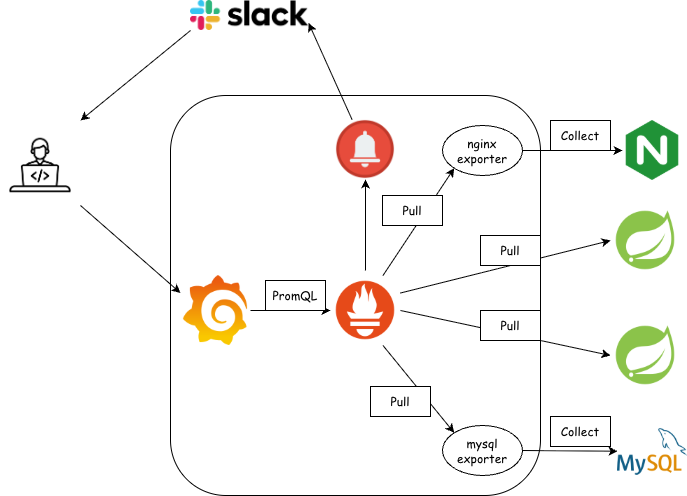
최종 아키텍처 구조는 위와 같다. 모니터링과 더불어 장애 상황에 대한 알람도 수신할 수 있게되어, 조금 더 안정성 있는 시스템으로 나아갈 수 있게 되었다!
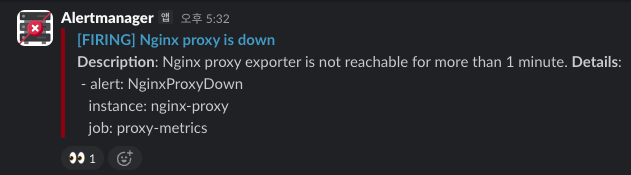
실제 Nginx 프록시 서버가 다운되어 알람을 수신받았었다. 해당 알람을 통해 프록시 서버의 이상을 확인하고 신속히 조치할 수 있었다.
내가 구축한 모니터링 시스템이 실제 장애 상황에서 큰 도움이 되어 기뻤다 ㅎㅎ
알람 문구는 조금 수정이 필요할 것 같다.